
If you are interested in buying a laptop for video editing or photo editing at the present time, you are entering the market that looks way different from just a few years ago. The hardware and components have evolved in advanced technology such as Processor, Graphics, Storage SSD drives, Displays and RAM etc, but the software workflow has transformed even faster. AI is no longer just a buzz word but is now embedded within silicon and software you use daily.
As now editing and softwares got updated with Artificial Intelligence plug-ins, choosing the wrong editing laptop today doesn’t just mean slow renders but also means missing out on the on-device. AI acceleration that can cut your editing time in half. Whether you are a beginner editing YouTube videos, a professional working with 4K footage, or a content creator managing demanding production projects, the right laptop for content creation can make your workflow faster and more efficient.
In this guide, we compare seven laptops for video editing, covering Apple’s MacBook Pro lineup, MSI’s performance-focused machines, Razer’s powerful workstation-style laptop, ASUS’s portable creator device, and Lenovo’s professional workstation. We examine their specifications, advantages, limitations, and suitability for different editing requirements
Why the Right Laptop Matters More Than Ever in 2026
In the past, buying a powerful laptop usually meant sacrificing battery life or dealing with bulky chases. In 2026, the tables have turned. The development of more efficient architectures like Apple’s M5 series, the latest Intel Core Ultra and AMD Ryzen AI chips means you can get workstation-class performance in portable devices on your desk.
However, the biggest change is the local AI revolution. Video editing software like Adobe Premiere Pro now rely heavily on GPU-accelerated AI models for tasks like auto-reframing, object removal, and speech-based text editing. If your notebook video editing setup lacks the specific neural processing hardware, these features will either run slowly or offload to the cloud, costing you time and subscription fees.
Key Features to Look For in a Video Editing Laptop
To ensure you find a top rated laptop for video editing, you need to look past the marketing and check the specifications that actually accelerate your timeline.
Processor Power
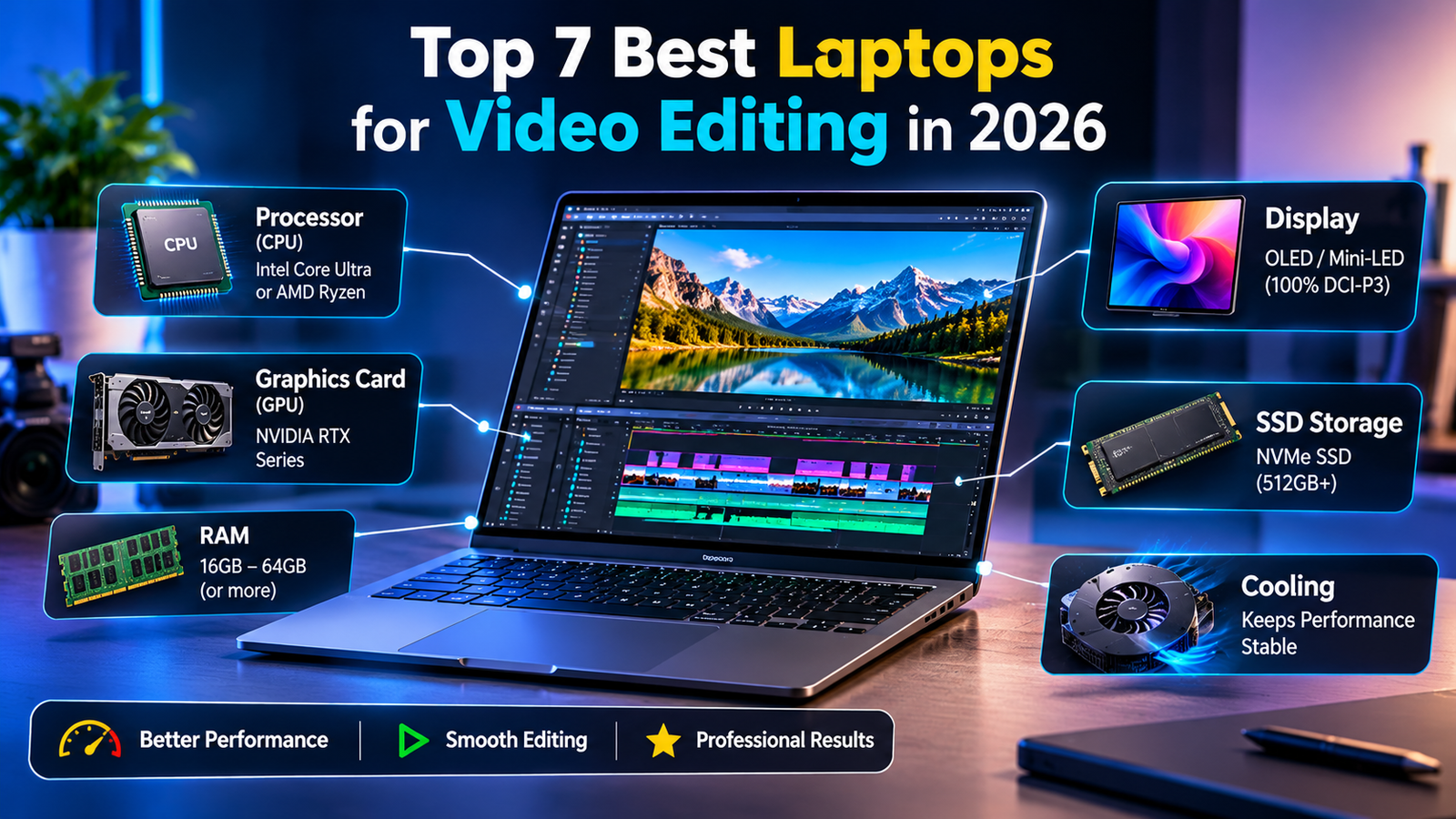
For a laptop for photo and video editing, the CPU handles the decoding and encoding of your footage. In 2026, look for H-series or HX-series processors (Intel Core Ultra 7/9 or AMD Ryzen 9). For Mac users, the M5 and M5 Max chips offer a massive leap in super core performance making them ideal for heavy export tasks.
Graphics Card (GPU) and AI Acceleration
Here is what it changes with 2026. Discrete GPUs with dedicated AI acceleration are available in both NVIDIA’s RTX 50-series (Blackwell) and RTX Spark. Both are the best for Windows based machines, having dedicated cores for AI upscaling and effects rendering. The M5 Max has a unified architecture with a 40-core GPU that can handle intensive colour grading with ease.
RAM and Storage
For a good laptop to edit videos, 16GB is the absolute minimum for basic tasks. For professionals working on 4K videos, 32GB will be your sweet spot but if you are doing professional multi-cam or visual effects then you’ll want 64GB. Many modern things and lights have soldered RAM so make sure you get the capacity you need.
SSD vs. HDD
Do not buy a video editing laptop with a mechanical hard drive in 2026. You need an NVMe SSD for your operating system, software, and active project files. A fast SSD drastically reduces load times and prevents timeline stuttering during playback .
Display Quality
For a best laptop for photo and video editing, the screen is your window to the project. Look for OLED or Mini-LED panels with 100% DCI-P3 coverage and high peak brightness (500+ nits) for accurate HDR grading .
Top 7 Best Laptops for Video Editing in 2026
The following picks are based on verified testing and current market availability from trusted sources like PCMag and Newegg.
1. Apple MacBook Pro 14-Inch (2025, M5)
The Apple MacBook Pro 14-inch with the M5 chip is a good option for creators. It has the M5 chip which features a 10-core CPU and 10-core GPU plus specific media processors to allow editing of supported video formats. It has the Liquid Retina XDR screen from Apple which makes it ideal for editing detailed media.
Specifications:
- CPU/GPU: Apple M5 chip with next-gen Neural Accelerators
- RAM: 16GB to 32GB Unified Memory
- Display:2-inch Liquid Retina XDR
- Storage: 512GB to 2TB SSD
Pros and Cons:
- Pros: Incredible performance-per-watt; the M5 GPU is a massive upgrade for AI effects and timeline scrubbing; excellent battery life; best-in-class display for color accuracy .
- Cons: Expensive upgrades for RAM and storage; design is unchanged from previous generations; limited to Thunderbolt 4 (not 5) on this specific model .
2. MSI Katana 15 HX
The MSI Katana 15 HX is an affordable choice for beginner or intermediate Windows video editors. Depending on its regional configuration, it has a combination of an Intel Core i7-14650HX processor and an NVIDIA GeForce RTX 5050 graphics card. With a dedicated GPU, it can handle basic AI assisted editing and general creative tasks
Specifications:
- CPU: Intel Core i7 HX-series
- GPU: NVIDIA GeForce RTX 5050
- RAM: 16GB DDR5
- Display:6-inch FHD 144Hz
- Storage: 512GB NVMe SSD
Pros and Cons:
- Pros: Unbeatable price for entry into RTX 50-series AI acceleration; handles 1080p and light 4K editing well; comfortable keyboard .
- Cons: The display is relatively dim and lacks full DCI-P3 coverage, making it less ideal for critical color grading; 512GB storage fills up fast with video files .
3. Razer Blade 18 (2025)
In Razer Blade 18 the Intel Core i9-13900HX delivers strong multi-core performance and fast video transcoding thanks to its Intel Core Ultra 9 275HX processor combined with up to an RTX 5090 laptop GPU. The 18″ chassis also has a Thunderbolt 5 port, SD card reader and upgradable RAM and SSD slots.
Specifications:
- CPU: Intel Core Ultra 9
- GPU: NVIDIA GeForce RTX 50-series
- RAM: 32GB DDR5
- Display: 18-inch Dual-mode Mini-LED (4K 120Hz / FHD 240Hz)
- Storage: 2TB SSD
Pros and Cons:
- Pros: Stunning build quality; the dual-mode display is versatile for both high-res editing and high-frame-rate gaming; superb battery life for its size .
- Cons: Extremely expensive; the slim chassis can limit peak performance under sustained loads due to thermal throttling .
4. MSI Raider 18 HX AI
This desktop replacement comes with an 18″ 4K Mini-LED screen with 100% DCI-P3 and VESA DisplayHDR 1000 making it perfect for HDR grading. The system comes configured with an Intel Core Ultra 9 285HX (up to), RTX 5090 GPU plus 64GB of DDR5 memory for heavy 4K workloads.
Specifications:
- CPU: Intel Core Ultra 9 285HX
- GPU: NVIDIA GeForce RTX 5080
- RAM: 64GB DDR5
- Display: 18-inch 4K Mini-LED 120Hz
- Storage: 2TB + 2TB SSD
Pros and Cons:
- Pros: Desktop-replacement power; the 4K Mini-LED screen is dazzling for HDR grading; 64GB RAM handles the heaviest 4K multicam timelines effortlessly .
- Cons: Very heavy and bulky; loud fans under load; mostly plastic chassis feels less premium than the price suggests .
5. Apple MacBook Pro 16-Inch (2026, M5 Max)
This powerful Apple MacBook Pro 16-inch (M5 Max version) is perfect for professionals that deal with large video files on a regular basis. It features an 18-core CPU and can be upgraded with a 40-core GPU plus up to 128GB of unified memory. With its large professional display and powerful media engines it works perfectly for intensive editing and rendering..
Specifications:
- CPU/GPU: Apple M5 Max (18-core CPU, 40-core GPU)
- RAM: 128GB Unified Memory (as tested)
- Display:2-inch Liquid Retina XDR with Nano-texture option
- Storage: 4TB SSD
Pros and Cons:
- Pros: The “super core” architecture delivers incredible performance for 8K workflows; 27+ hours of real-world battery life; the 40-core GPU destroys heavy render tasks .
- Cons: Base price has increased compared to the M4 generation; the design is aging and lacks the latest connectivity on some ports .
6. Asus ProArt PX13
With its AMD Ryzen AI Max+ chip and Radeon 8060S graphics, this 13-inch convertible can easily run video and photo editing tasks on a battery. With an impressive small OLED touch screen and great keyboard this is a good device for creative users.
Specifications:
- CPU: AMD Ryzen AI 9
- GPU: NVIDIA GeForce RTX 40-series (discrete)
- RAM: 32GB LPDDR5X
- Display:3-inch 3K OLED Touch
- Storage: 1TB SSD
Pros and Cons:
- Pros: Weighs just over 3 pounds; the OLED screen is gorgeous for on-location color checks; the DialPad touchpad is a genuinely useful shortcut tool for Premiere and Resolve .
- Cons: The ultraportable form factor limits sustained performance; the included AI “robo-mouse” assistant can be intrusive .
7. Lenovo ThinkPad P1 Gen 8
Lenovo positions this as an ISV-certified mobile workstation with Intel Core Ultra Series 2 processors and NVIDIA RTX PRO 2000 Blackwell graphics for stable, reliable performance in Adobe and DaVinci applications . It offers a Tandem OLED display option and Thunderbolt 5 connectivity, with MIL-SPEC durability testing for professional field use.
Specifications:
- CPU: Intel Core Ultra 7 255H
- GPU: NVIDIA RTX Pro 2000 Blackwell
- RAM: 32GB LPCAMM2 (Upgradable to 64GB)
- Display: 16-inch 3.2K Tandem OLED (1,500 nits)
- Storage: 1TB SSD
Pros and Cons:
- Pros: Industry-leading 1,500-nit HDR display with 100% DCI-P3; ISV-certified for rock-solid stability in Adobe and DaVinci; user-upgradable memory and dual Thunderbolt 5 .
- Cons: The RTX Pro 2000 GPU is optimized for stability and professional workflows, not raw gaming performance; it is very expensive .
Comparison Chart of Best Laptops for Video Editing
| Model | Best For | CPU | GPU | RAM | Display | Price Range |
| MacBook Pro 14 (M5) | Most People | Apple M5 | Apple M5 (Integrated) | 16GB – 32GB | 14.2″ Liquid Retina XDR | $1,886+ |
| MSI Katana 15 HX | Budget | Intel Core i7 HX | RTX 5050 | 16GB | 15.6″ FHD 144Hz | $1,239+ |
| Razer Blade 18 | Gaming/ Editing Hybrid | Intel Core Ultra 9 | RTX 50-series | 32GB | 18″ Dual-Mode Mini-LED | $4,099+ |
| MSI Raider 18 HX AI | 4K Editing | Intel Core Ultra 9 285HX | RTX 5080 | 64GB | 18″ 4K Mini-LED 120Hz | $3,799+ |
| MacBook Pro 16 (M5 Max) | High-End Apple | Apple M5 Max | 40-Core GPU | 128GB | 16.2″ Liquid Retina XDR | $3,499+ |
| Asus ProArt PX13 | Ultraportable | AMD Ryzen AI 9 | RTX 40-series | 32GB | 13.3″ 3K OLED | $2,081+ |
| Lenovo ThinkPad P1 Gen 8 | Professional Workstation | Intel Core Ultra 7 255H | RTX Pro 2000 | 32GB (Up to 64GB) | 16″ 3.2K Tandem OLED | $3,305+ |
Performance Metrics and User Recommendations
When looking at the performance benchmarks of the best laptop for creators in 2026, the MacBook Pro M5 Max is the best when it comes to exporting video files quickly using GPU accelerated AI. Whilst the MSI Raider 18 HX AI shines with its RTX 5080 for those looking to use CUDA accelerated DaVinci Resolve.
However, if you’re a student or new to video editing, the best budget laptop for video editing will be the MSI Katana as it provides the best entry level AI accelerated solution. If you’re a professional and want the best laptop for 4K video editing, then the Tandem OLED display on the Lenovo ThinkPad P1 is unrivalled for grading HDR on set. If you’re the majority of users wanting a portable and powerful laptop with the best laptop for video editing then you can’t go wrong with the 14-inch MacBook Pro.
Conclusion
The class of 2026 video editing laptops is defined by the integration of AI. Whether you are rendering a simple vlog or a complex cinematic sequence, the hardware is now smart enough to assist you. By prioritizing a color-accurate display for your laptop for photo and video editing, ensuring you have enough VRAM for AI models, and choosing a machine that fits your portability needs, you can build a content creation laptop setup that will serve you well for years to come.