

TLDR (Too Long Didn’t Read)
- Learn how to set up a comprehensive home automation system from scratch in 2026
- Discover the best smart home devices and ecosystems for seamless integration
- Understand cost-effective strategies to automate your home without breaking the bank
- Explore advanced automation tips including voice control, energy management, and security features
- Get actionable insights on choosing the right smart home protocol and avoiding common setup mistakes
Did you know that the global smart home market is projected to reach $174 billion by 2025, with over 400 million households expected to adopt home automation systems? As we step into 2026, home automation is no longer a luxury it’s becoming a necessity for modern living.
Whether you’re looking to enhance your home’s security, reduce energy bills, or simply enjoy the convenience of controlling everything from your smartphone, this home automation guide will walk you through everything you need to know. From selecting the right devices to creating automated routines that make your life easier, we’ve got you covered.
In this comprehensive guide, you’ll discover the essential steps to transform your traditional home into a smart, connected living space. We’ll explore the latest technologies, compare popular ecosystems, and provide actionable tips that you can implement today to start your smart home journey.
Understanding Home Automation: The Foundation of Smart Living
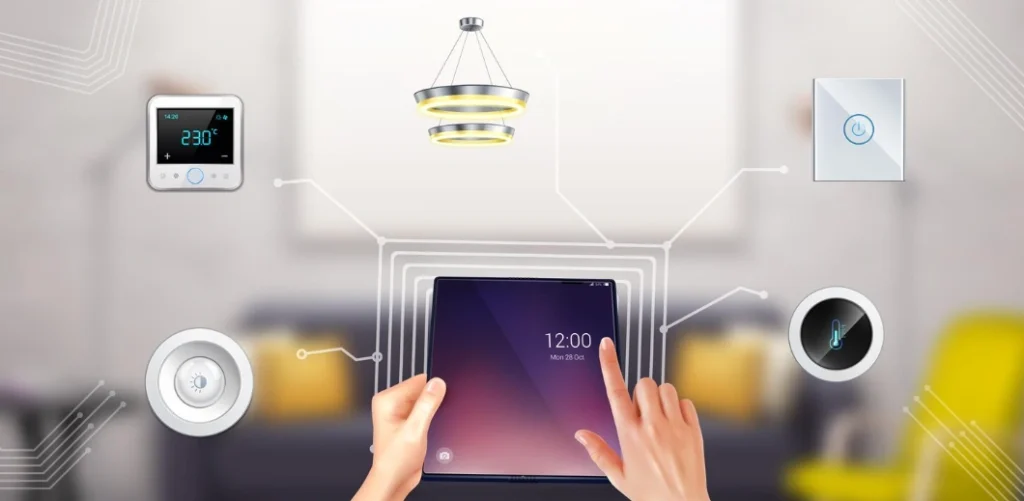
Home automation, also known as domotics, refers to the automatic control of electronic devices in your home. These devices are connected to the internet, allowing you to control them remotely using a smartphone, tablet, or voice commands. The beauty of a smart home automation system lies in its ability to learn your preferences and create automated routines that enhance comfort, security, and energy efficiency.
According to a report by Statista, the number of smart homes worldwide is expected to reach 785 million by 2026, representing a massive shift in how we interact with our living spaces.
Key Components of a Smart Home
A complete home automation setup typically includes:
- Smart Hub/Controller: The central brain that connects and manages all your smart devices (Samsung SmartThings, Amazon Echo Plus, Google Nest Hub)
- Smart Lighting: LED bulbs and switches that can be controlled remotely and scheduled (Philips Hue, LIFX, Wyze Bulbs)
- Smart Thermostats: Energy-efficient climate control systems that learn your preferences (Nest Learning Thermostat, Ecobee, Honeywell Home)
- Security Systems: Smart cameras, door locks, and motion sensors for enhanced protection
- Voice Assistants: Amazon Alexa, Google Assistant, or Apple Siri for hands-free control
- Smart Appliances: Refrigerators, washing machines, and ovens with connected features
At Intrasoft Tech, we understand that building a smart home can seem overwhelming, which is why we’ve created this comprehensive guide to simplify your journey.
Choosing the Right Home Automation Ecosystem
One of the most critical decisions in your home automation guide journey is selecting the right ecosystem. The three major platforms dominating the market in 2026 are Amazon Alexa, Google Home, and Apple HomeKit. Each has its strengths and limitations.
Amazon Alexa Ecosystem
Amazon Alexa continues to lead the market with the widest device compatibility and third-party integrations. With over 140,000 compatible smart home devices, Alexa offers unparalleled flexibility.
Pros:
- Extensive device compatibility
- Affordable entry points (Echo Dot starts at $49.99)
- Robust automation routines
- Multi-room audio capabilities
Cons:
- Privacy concerns with always-listening devices
- Can be complex for beginners
Google Home Ecosystem
Google Home excels in natural language processing and integration with Google services. If you’re heavily invested in the Google ecosystem (Gmail, Calendar, Photos), this is your best bet.
Pros:
- Superior voice recognition and natural conversations
- Seamless integration with Google services
- Strong AI-powered automation
- Excellent smart display options
Cons:
- Fewer third-party integrations than Alexa
- Higher price points for premium devices
Apple HomeKit Ecosystem
Apple HomeKit prioritizes privacy and security, with all automation processing happening locally on your devices rather than in the cloud.
Pros:
- Industry-leading privacy and security
- Seamless integration with Apple devices
- Local processing (no cloud dependency)
- Premium build quality
Cons:
- Limited device compatibility
- Higher costs across the board
- Requires an Apple device (iPhone, iPad, or HomePod)
According to research from Parks Associates, 28% of U.S. households now own at least one smart home device, with voice-controlled speakers being the most popular entry point.
For more insights on smart home technology, explore our detailed guides on choosing the right ecosystem for your needs.
Step-by-Step Home Automation Setup Guide
Now that you understand the basics, let’s dive into the practical steps to set up your smart home automation system.
Step 1: Assess Your Needs and Budget
Before purchasing any devices, identify what you want to automate:
- Security-focused: Prioritize smart locks, cameras, and motion sensors ($500-$1,500)
- Energy efficiency: Focus on smart thermostats, lighting, and power monitors ($300-$800)
- Convenience: Start with voice assistants, smart speakers, and lighting ($200-$600)
- Entertainment: Smart TVs, streaming devices, and multi-room audio ($400-$1,200)
A basic smart home setup can start at just $300-$500, while a comprehensive system may cost $2,000-$5,000 or more.
Step 2: Start with a Smart Hub
Your smart hub is the foundation of your home automation system. Popular options include:
- Samsung SmartThings Hub ($99.99) – Best for advanced users
- Amazon Echo (4th Gen) ($99.99) – Best for Alexa ecosystem
- Google Nest Hub (2nd Gen) ($99.99) – Best for Google users
- Apple HomePod mini ($99) – Best for Apple ecosystem
Step 3: Install Smart Lighting
Smart lighting is the easiest and most impactful first step. You have two options:
Smart Bulbs: Replace existing bulbs with smart LED bulbs (Philips Hue, LIFX, Wyze) Smart Switches: Replace wall switches to control any bulb (Lutron, TP-Link Kasa)
Pro Tip: Start with high-traffic areas like living rooms and bedrooms, then expand to other rooms.
Step 4: Add Climate Control
A smart thermostat can reduce your energy bills by 10-23% annually, according to Energy Star. Popular models include:
- Google Nest Learning Thermostat ($249) – Best overall
- Ecobee SmartThermostat ($249) – Best with room sensors
- Honeywell Home T9 ($199) – Best budget option
Step 5: Enhance Security
Security is a top priority for most homeowners. Essential devices include:
- Video Doorbells: Ring, Nest Hello, Arlo ($179-$229)
- Smart Locks: August, Schlage Encode, Yale ($199-$299)
- Security Cameras: Arlo Pro, Wyze Cam, Ring Stick Up ($49-$249)
- Motion Sensors: Samsung SmartThings, Aqara ($19-$39 each)
Step 6: Create Automation Routines
This is where the magic happens. Automation routines allow your devices to work together seamlessly:
Morning Routine:
- Lights gradually brighten at 6:30 AM
- Thermostat adjusts to 72°F
- Coffee maker starts brewing
- News briefing plays on smart speaker
Away Mode:
- All lights turn off
- Thermostat adjusts to eco mode
- Security cameras activate
- Door locks engage
Night Routine:
- Lights dim at 10 PM
- Thermostat lowers to 68°F
- Doors lock automatically
- Security system arms
Intrasoft Tech offers comprehensive automation solutions tailored to your specific needs and lifestyle.
Advanced Home Automation Strategies for 2026
Once you’ve mastered the basics of your home automation guide, it’s time to explore advanced features that truly transform your living experience.
Voice Control Mastery
Voice control has evolved significantly. In 2026, natural language processing allows for complex, conversational commands:
- “Hey Google, I’m leaving” (triggers away mode)
- “Alexa, movie time” (dims lights, closes blinds, turns on TV)
- “Hey Siri, good morning” (executes morning routine)
Pro Tip: Create custom voice commands for frequently used scenarios to save time and effort.
Energy Management and Monitoring
Smart energy monitoring can reduce your electricity bills by up to 30%. Modern systems provide:
- Real-time energy consumption tracking
- Device-level energy usage breakdown
- Automated power scheduling for high-consumption appliances
- Integration with solar panels and battery storage
According to the U.S. Department of Energy, smart home devices can help identify energy waste and optimize consumption patterns.
Geofencing and Presence Detection
Geofencing uses your smartphone’s location to trigger automated actions:
- Lights turn on when you’re 5 minutes from home
- Thermostat adjusts when you leave for work
- Security system arms/disarms based on presence
- Garage door opens automatically as you approach
Integration with Renewable Energy
In 2026, smart home systems increasingly integrate with solar panels, wind turbines, and battery storage:
- Automated charging of electric vehicles during off-peak hours
- Load balancing to maximize solar energy usage
- Battery storage optimization
- Grid connectivity for energy selling during peak times
AI-Powered Predictive Automation
Modern smart homes use artificial intelligence to predict your needs:
- Learning your temperature preferences throughout the day
- Adjusting lighting based on natural light levels
- Predicting when you’ll arrive home
- Suggesting energy-saving opportunities
For expert guidance on implementing these advanced features, visit our automation solutions page at Intrasoft Tech.
Smart Home Security: Protecting Your Connected Devices
With great connectivity comes great responsibility. As you build your smart home automation system, security should be a top priority.
Essential Security Practices
1. Secure Your Wi-Fi Network
- Use WPA3 encryption (the latest standard)
- Create a strong, unique password (minimum 16 characters)
- Set up a separate guest network for smart devices
- Enable network encryption
2. Regular Firmware Updates
- Enable automatic updates when available
- Check manufacturer websites monthly for updates
- Replace devices that no longer receive security patches
3. Use Two-Factor Authentication
- Enable 2FA on all smart home apps
- Use authenticator apps instead of SMS
- Create unique passwords for each service
4. Network Segmentation
- Create a dedicated IoT network
- Keep smart devices separate from computers and phones
- Use VLANs for advanced network isolation
5. Privacy Settings
- Disable unnecessary data collection
- Review app permissions regularly
- Use privacy-focused alternatives when possible
According to Cybersecurity Ventures, cyberattacks on IoT devices are expected to double by 2025, making security more critical than ever.
Choosing Secure Smart Devices
When shopping for smart home devices, prioritize:
- Devices with built-in encryption
- Manufacturers with strong security track records
- Products that receive regular security updates
- Devices certified by security organizations (UL, CSA)
Cost-Effective Home Automation: Budget-Friendly Tips
You don’t need to spend thousands to enjoy the benefits of home automation. Here’s how to build a smart home on a budget.
Starter Package ($300-$500)
- Smart Speaker with Hub: Amazon Echo 4th Gen ($99.99)
- Smart Bulbs: Wyze Bulbs 4-pack ($39.96)
- Smart Plug: TP-Link Kasa 4-pack ($29.99)
- Smart Thermostat: Wyze Thermostat ($79.98)
- Video Doorbell: Wyze Video Doorbell ($49.98)
Total: ~$300
Mid-Range Package ($800-$1,200)
Add to starter package:
- Smart Lock: August Wi-Fi Smart Lock ($229.99)
- Security Camera 2-pack: Wyze Cam v3 ($59.96)
- Smart Light Switches: Kasa Smart Switch 3-pack ($59.99)
- Smart Display: Google Nest Hub ($99.99)
- Motion Sensors: Samsung SmartThings 3-pack ($69.99)
Total: ~$820
Premium Package ($2,000-$3,000)
Upgrade to premium devices:
- Google Nest Learning Thermostat ($249)
- Philips Hue Starter Kit ($199.99)
- Ring Video Doorbell Pro 2 ($249.99)
- Schlage Encode Plus Smart Lock ($299.99)
- Arlo Pro 4 Camera 3-pack ($499.99)
- Sonos One Speakers 2-pack ($438)
Money-Saving Strategies
- Start Small: Begin with one room and expand gradually
- Bundle Deals: Look for ecosystem bundles (Alexa + Ring, Google + Nest)
- Holiday Sales: Black Friday and Prime Day offer 30-50% discounts
- Refurbished Devices: Save 20-40% on certified refurbished products
- DIY Installation: Avoid professional installation fees ($100-$500 per device)
Want to explore more budget-friendly tech solutions? Check out our latest articles at Intrasoft Tech’s blog for comprehensive reviews and comparisons.
Common Home Automation Mistakes to Avoid
Learning from others’ mistakes can save you time, money, and frustration in your home automation guide journey.
Mistake #1: Not Planning for Compatibility
The Problem: Buying devices that don’t work together The Solution: Choose one ecosystem (Alexa, Google, or Apple) and stick with it. Check compatibility before purchasing.
Mistake #2: Ignoring Wi-Fi Coverage
The Problem: Smart devices in dead zones lose connectivity The Solution: Invest in mesh Wi-Fi systems (Google Wifi, Eero, Netgear Orbi) to ensure whole-home coverage.
Mistake #3: Overlooking Power Requirements
The Problem: Battery-powered devices require frequent charging The Solution: Prioritize wired or long-battery-life devices for critical functions (locks, cameras).
Mistake #4: Buying Too Much Too Fast
The Problem: Overwhelming yourself with too many devices The Solution: Start with 3-5 essential devices, master them, then expand.
Mistake #5: Neglecting Security
The Problem: Leaving default passwords and settings The Solution: Change all default passwords immediately and enable 2FA.
Mistake #6: Forgetting About Scalability
The Problem: Choosing devices that don’t grow with your needs The Solution: Select platforms that support hundreds of devices and have robust developer communities.
Future Trends in Home Automation for 2026 and Beyond
The smart home automation landscape is evolving rapidly. Here’s what to expect in the coming years.
Matter Protocol Adoption
Matter, the new universal smart home standard, is revolutionizing device compatibility. By 2026, most new devices support Matter, allowing seamless cross-platform integration. This means your Amazon Alexa can control Apple HomeKit devices and vice versa.
AI-Driven Personalization
Advanced machine learning algorithms will predict your preferences with unprecedented accuracy:
- Homes that automatically adjust to your mood
- Lighting that syncs with your circadian rhythm
- HVAC systems that optimize for health and comfort
- Predictive maintenance alerts before devices fail
Sustainability Focus
Environmental consciousness is driving innovation:
- Carbon footprint tracking for all devices
- Integration with renewable energy sources
- Water conservation monitoring
- Automated recycling and waste management systems
Health and Wellness Integration
Smart homes are becoming health hubs:
- Air quality monitoring and automatic purification
- Sleep tracking and optimization
- Posture correction through smart furniture
- Integration with wearable health devices
Edge Computing
More processing happens locally rather than in the cloud:
- Faster response times
- Enhanced privacy
- Reduced dependency on internet connectivity
- Lower latency for critical functions
According to McKinsey & Company, the smart home industry will continue growing at 20% annually through 2027.
Frequently Asked Questions (FAQs)
Q1: How much does it cost to automate a home in 2026?
A basic smart home setup starts at $300-$500, mid-range systems cost $1,000-$2,000, while comprehensive automation can range from $3,000-$10,000+ depending on home size and features.
Q2: Can I install home automation devices myself?
Yes, most modern smart devices are designed for DIY installation with simple plug-and-play setup or basic wiring skills for switches and thermostats.
Q3: Which smart home ecosystem is best for beginners?
Amazon Alexa offers the easiest entry point with affordable devices and the widest compatibility, making it ideal for beginners starting their home automation journey.
Q4: Are smart homes secure from hackers?
With proper security measures like strong passwords, regular updates, network segmentation, and two-factor authentication, smart homes can be very secure against cyber threats.
Q5: Do smart home devices work without internet?
Some devices function locally without internet (like smart switches), while others require connectivity for remote access and cloud-based features like voice control.
Conclusion
Building a smart home in 2026 is more accessible, affordable, and beneficial than ever before. This home automation guide has walked you through every essential step from choosing the right ecosystem and devices to implementing advanced automation strategies and securing your connected home.
The key to success is starting small, planning carefully, and expanding gradually as you become more comfortable with the technology. Whether you’re focused on energy savings, enhanced security, or simply making daily life more convenient, home automation offers tangible benefits that improve your quality of life. Remember that the smart home journey is ongoing, with new technologies and capabilities emerging regularly.
At Intrasoft Tech, we’re committed to helping you navigate the evolving landscape of home automation. Our team of experts stays updated on the latest trends, technologies, and best practices to ensure you make informed decisions. If you found this guide helpful and want to explore more cutting-edge technology insights explore more blogs on our website covering everything from IoT innovations to cybersecurity best practices.
Ready to transform your home into a smart living space? Start with one device today, and before you know it, you’ll be enjoying the full benefits of automated living.